Making WordPress behave on Upsun
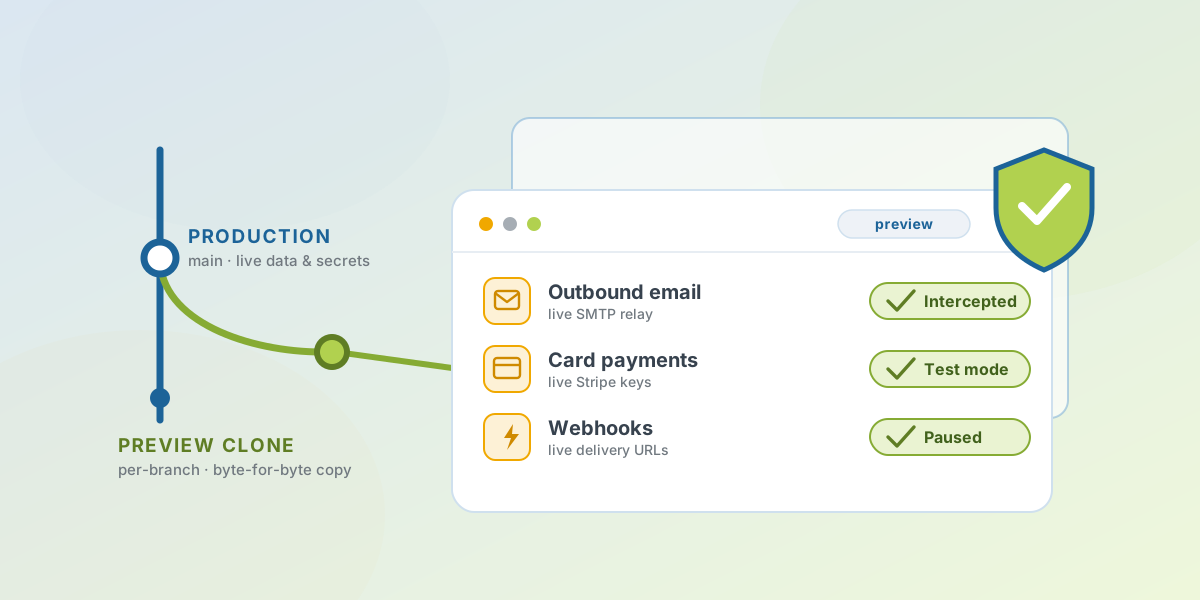
Here is a scenario that should worry anyone running WordPress on a modern platform. You clone production to a preview branch to test a change. That clone is byte-for-byte: the same database, the same options, the same secrets. Which means the same live Stripe keys, the same webhook URLs, the same SMTP credentials. You place a test order to check your change. Stripe charges a real card. WooCommerce fires a real webhook at your fulfilment system. A customer gets a shipping email for an order that only exists on a branch you’ll delete in an hour.
None of that is a WordPress bug. It’s WordPress doing exactly what it was built to do — assume it’s the single, mutable, only copy of itself — on a platform whose entire value is that it isn’t. I closed the gap with an open-source plugin: upsun-wp, a must-use plugin that teaches WordPress where it lives.
The diagnosis
Traditional WordPress assumes one server it can write to whenever it likes. Upsun — where I work — gives you the opposite: immutable builds, a read-only filesystem, and preview environments that are exact clones of production, spun up per branch. Every one of those is a feature. Every one of them also breaks an assumption baked deep into WordPress and its plugin ecosystem.
So WordPress does the wrong thing in small ways and large. It offers to auto-update plugins onto a filesystem it can’t write. Its Site Health tool reports scary-looking failures for things that are actually correct on the platform. It has no idea it’s a preview clone, so it treats live payment credentials as live. The plugin’s job is to hand WordPress the context it’s missing, and then get out of the way.
SafePreviews
This is the flagship, and the reason the whole thing exists. SafePreviews neutralises dangerous integrations the moment a preview environment boots — without modifying the database, so the clone stays a faithful copy of production for everything that matters:
- Mail is intercepted.
wp_mailcalls are caught before they leave the box. The default is log-only; you can allow or redirect instead. - Payments are forced to test mode. Stripe is flipped to test mode at option-read time, so the cloned live keys are simply never used.
- Webhooks are paused. WooCommerce webhook deliveries don’t fire from a preview, so nothing downstream reacts to a throwaway environment.
Because none of that touches the database, there’s no migration to run and
nothing to undo — the protection is a runtime decision keyed on the
environment type. For the cases where you do want the data itself
scrubbed — anonymising user emails, deactivating a plugin, wiping a
sensitive option — there’s an opt-in, idempotent wp upsun sanitize you
wire into the deploy hook. It stamps the environment so it fires once per
fresh clone and never repeats.
The rest of the plugin
SafePreviews gets top billing, but it’s one of thirteen modules, each independently toggleable and each a no-op off-platform:
| Module | What it does |
|---|---|
| environment-indicator | Colour-coded admin-bar badge, dashboard widget, and login banner so you always know which environment you’re on |
| page-cache | Emits Cache-Control headers that let Upsun’s router cache anonymous responses |
| site-health | Rewrites Site Health checks to understand the platform — object cache, cron, mount writability, disk, service health |
| updates-policy | Disables in-app auto-updates (the filesystem is read-only) and replaces the toggles with an honest note |
| preview-protection | Sends noindex/nofollow on non-production so preview clones stay out of search |
| smtp | Routes PHPMailer to the platform relay unless a mailer plugin already owns SMTP |
| cron-heartbeat | Schedules a recurring event that proves cron actually runs, and flags staleness |
| mount-usage | Per-mount disk visibility, warning at 80% and failing at 95% |
| writable-paths | Compares what plugins need to write against declared mounts, and suggests ready-to-paste YAML |
| security-headers | Baseline response headers, with HSTS handled based on whether Cloudflare is fronting |
| cloudflare | Detects Cloudflare, adds a health check and edge-cache purge — without rewriting REMOTE_ADDR, which is already correct |
| dashboard | A top-level “Upsun” admin page collecting environment, services, health, and cache config in one place |
There’s also a wp upsun command toolbox for the deploy hook and the
terminal — doctor runs the health checks with a real exit code so CI can
fail on them, cache-check <url> tells you why a page isn’t being cached,
migrate applies ordered, database-tracked deploy migrations, and vendor
packages a premium plugin as a local Composer path package so licensed code
lives in the repo without its licence key.
The principles I held to
Two rules shaped every decision, and they’re worth stating because they’re what keep a plugin like this from becoming a liability of its own.
It reads the platform; it never rewrites your config. The plugin pulls
everything it knows from Upsun’s environment variables directly. It doesn’t
define a single WordPress constant — wp-config.php stays the sole
authority over your database credentials and salts. Nothing to reconcile,
nothing to fight over.
It’s completely inert off-platform. On your laptop, in CI, anywhere that isn’t Upsun, the plugin boots and does nothing. The CLI commands print “Not running on Upsun” and exit cleanly. There’s no special-casing to remember, because “not on the platform” is just the quiet path.
And it stays generic. This is a plugin for any WordPress project on Upsun, not for mine. Site-specific behaviour belongs in the consuming project, which is why every built-in integration — WooCommerce, Stripe, Wordfence, UpdraftPlus, WP Rocket — is wired through the same public filters you’d use yourself. If the shipped integrations can be built on the public API, so can yours. There are sixty-odd filters; if I had to reach past them to make the bundled ones work, the API would be lying.
The honest caveat
A plugin that makes WordPress “behave on a platform” is still a plugin, and
it can’t repeal physics. SafePreviews protects the integrations it knows
about and the ones you teach it through upsun_preview_sanitizers; a bespoke
integration that talks to a third party in its own way is your job to add to
the list — the hook is there, but it won’t guess. Vendoring premium plugins
keeps their code in the repo, not their licences current; you still update
them deliberately. And the read-only filesystem is a real constraint, not
one the plugin removes — it makes the constraint legible (here’s what
wants to write, here’s the mount you’re missing) rather than making it
disappear.
That trade is the whole point, though. The plugin doesn’t pretend WordPress is something it isn’t. It tells WordPress the truth about where it’s running — immutable, cloned, read-only — and lets it act accordingly. A preview you can clone without holding your breath is worth more than one more thing that behaves perfectly right up until the night it emails a customer.
It’s MIT-licensed and on GitHub, with a deploy-ready starter if you want the whole thing pre-wired. WordPress is still a fine tool where its model fits — this site left it behind for reasons that had nothing to do with WordPress being bad at what it does. When its model does fit, it deserves to know what platform it’s standing on.